Showing posts with label freeware. Show all posts

2009-05-09

my buddy, KeePass [freeware]


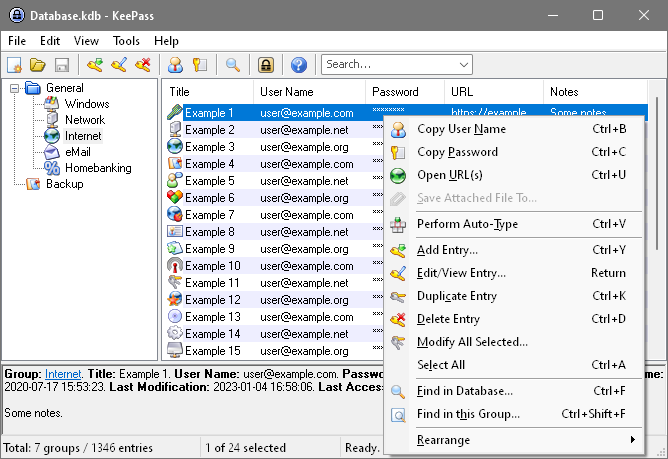
let's talk about password security. are you like me and are paranoid that someone is going to see a password of yours and run through all your files and destroy you? it's okay if you're not, it may just be me spending too much time in the realm of network security. however, if you do have a billion different passwords for all your documents, applications, accounts, and websites, you will be relieved to know that there are others like you and they've created KeePass which is a free, open source password manager.

this program not only holds and sorts your usernames and passwords, it also encrypts the passwords so that an unauthorized person cannot access the data even when the password file is retrieved. SCORE!

you may be wondering how useful this app can be if it lives on your desktop or laptop. you can have multiple installations of this program and run them off of the same database file (.kdb) AND the creators and contributors of this program must be geniuses because they have a KeePass Portable for your ever so handy USB memory stick.

if you haven't been wowed yet, you should check out the plug-ins and extensions available to KeePass ( http://keepass.info/plugins.html ):

  • additional encryption

  • browser integration

  • scripting utilities

  • backup options

  • reporting

  • imports and conversions

this program is simple enough to run if you are already experienced enough to have a need for it. if not, there is a place where you can go for help:
2009-02-28

viigo is the winner! [freeware, beta]

alright, so i didn't hold an official competition of sorts but i did install both viigo and freerange to my blackjack II to see which one i would favor the most and why. i couldn't feel right with judging a product just for its looks.

what i had previously said for the free freerange newsreader, about it not needing more than 10 feeds for my device is a crock of bleh.

i need to know how things are going in the NHL (3 feeds), general local news (3 feeds), national news (4 feeds), international news (3 feeds), health news 4 feeds), technical / health / devices/ scientific (5 feeds)... etc.

as you can see, i well surpass the 10 feed limit that one is allotted with freerange.

both readers can be managed from their web interfaces

viigo: i can't e-mail the news to my contacts; but, i can tweet it to the world.
freerange: 10 feeds, really... just 10 feeds?

final say, go with freerange if you don't need more than 10 feeds and go with viigo if you're a news whoring retweeter like me and don't care about seeing the words "beta" on the client.

----------------
Now playing: 07 - Mike Doughty - I Got the Drop on You
via FoxyTunes

2009-01-28

viigo newsreader [freeware]

this is a beta news reader, 3.0 being their latest release; however, this product helps make your mobile device even more indispensable.  it's a program that gathers the latest news from a LOAD of content providers.  best part of it all is that it's free.  it better be since it's still in beta.

i added this application on right after i loaded the latest mobile 6.1 onto my blackjack 2 and i haven't had any problems with it yet.  the registration is a little tricky if you forget about doing it to begin with.  you start off with a guest account and perform the steps below to register.
Guest accounts cannot be used to manage feeds. You must first create a registered account within Viigo before you can manage your feeds from this console. To create an account, launch Viigo and go to: Options > Account > Create New Account

i feel as if i can't be without this application now.  it gives me a mobile connection to the global loop without having to run through multiple websites or applications to get to what i need to know.  i love it how i can mark a story to be saved and that i can update channels individually.  before, i just used my phone for its e-mail, calendar, and phone functions; but, now it's my daily newspaper.

if you couldn't already tell, i highly suggest installing this app on your smartphone.  :D

2009-01-27

mobile IM apps, oh my [freeware]

yes, there is an 's' in apps.  there are serious options out there beside the basic IM client that came on your smartphone.


i used to use 'palringo' but as of today i found out that there are many similar 
[freeware] apps that cover the same stuff.  i'm hoping that they do so in a cleaner fashion that what i'm used to.  i am going to try out 'fring' next.  i had a good time with palringo but i have the feeling that there may be something better out there.

i am not advertising/backing a specific client as of yet but i am open to hearing your take on any of the below programs for your smartphone.

2009-01-23

fire the bugs [freeware]

this post is for my newly found firefox plugin, firebug.  thanks to my san diego colleague, jason, i have a new toy to assist in killing code related headaches.  this is really, really, really useful for ANY web developer out there.

firebug integrates with firefox to put a wealth of web development tools at your fingertips while you browse.  you can edit, debug, and monitor CSS, HTML, and JavaScript live in any web page.

2009-01-22

scary times

what's scary for a geek?  well, layoffs is one but i believe that is true for most everybody.   however, layoffs and bankruptcies of the big boys in the industry is a very frightful thing.  i had to message my hubby last week that our daddy, nortel, looks to be out of the game.   :/   this is not as pervasive as the bad practices which caused the dot.com bubble to pop back in 2000. this is a bit of bad management, bad choices, and an even nastier economy.


this morning when i pulled up the news i got to see this, "Microsoft slashes up to 5,000 jobs."  yes, it's normal to be afraid but don't be afraid and helpless.  be prepared and if you are laid-off, work with what ya got.  try not to get mad, the anger will just block your vision and way to achieving your goal; anger is generally a waste of time... try to take care of it through a nice, non-addictive video game.

you can definitely stay geek and be unemployed; however, how is one supposed to afford tools to tinker in the trade without monetary backing?  you can't really,  without the help from corporate or fellow geeks who don't mind sharing or offloading their gear to you.

here are some ideas for the unemployed tech on keeping geek:
  1. if you're like me... you may be living off of some of your the gear that your old company "retired" and although retired, you can still play with the interfaces.  get creative and don't let those skills disappear on you.
  2. this may sound a bit wacky to the average tech geek but get together with fellow geeks or if you don't have many of those who you can peaceably hang around with, head off to a cool tech conference in your industry and start making friends.   =D
  3. social networking!  some of y'all might not have liked parts of #2 above but it shouldn't be painful to join linkedin, facebook, plaxo, myspace, or friendster.
  4. don't disappear - keep friends updated with the use of tweets on twitter.  this is cool because it's possible for you to update your twitter profile and have that status go out to plaxo and facebook.  
  5. k.i.t. - keeping in touch --  there are so many ways to get a hold of and catch up with others.   i prefer to use digsby, a multi protocol IM client that lets you chat with all your friends on AIM, MSN, Yahoo, ICQ, Google Talk, and Jabber with one simple to manage buddy list. on top of that, you can take a look at and update your twitter, linkedin, and facebook status'.  digsby is the client to go with for e-mail notifications, social network updates, and instant messaging all in one free client.

2009-01-21

kinoma, a handy mobile media product [freeware]


kinoma freeplay is a freeware program that i've been using on my smartphone (blackjack 2 w/ windows mobile 6.1).

i love the media management and online searches. it is soooo nifty to have youtube in the palm of my hands. notice how i said nifty? it is not a requirement of mine to have youtube at the drop of a hat. besides, all that will kill my device's battery.

almost all the things i'm about to list about kinoma are battery killers; however, if you are like me and have your smartphone at the side of your hip 24/7, then you probably also carry a usb connector to keep your phone charged every chance you get.

either way, this multimedia organizer is a must have for me, especially with the history function that allows the user to go back to a youtube stream they watched earlier in the day.

one common complaint i heard from customers was that their battery life is short. well, that'll happen when you are sitting around playing with all the new nifty features of your device. no sarcasm there, i wooork my smartphone too.